
>Utilities>System Options>Order Entry>Order Entry
Category Authorization
Type- Must be Global 
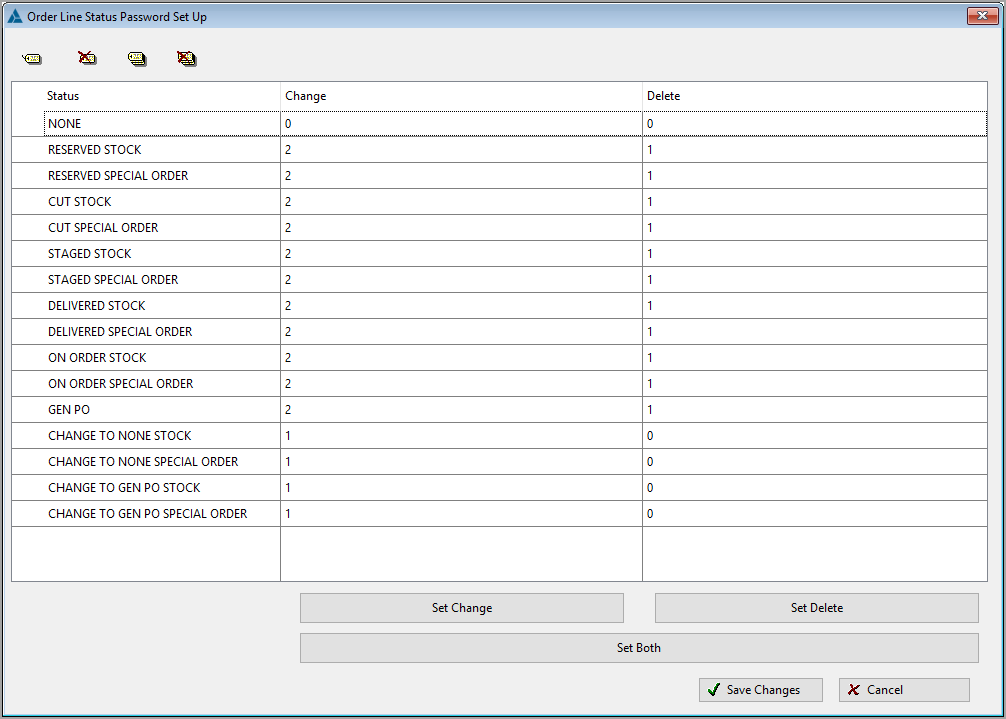
This system option allows passwords/roles to be set for changing lines with Stock and Special order goods independently.

This system option does not apply to the adjust status button. It should be password protected separately.
- Choose the line status(s) to set and tag it/them.
- To set the password/role the same for both click the set both button.
- The select password screen or select role screen will display.
- Use the select button to apply.
- To have a different level for change and delete, use only the change or delete button.
Change to…
CHANGE TO NONE STOCK
CHANGE TO NONE SPECIAL ORDER
CHANGE TO GEN PO STOCK
CHANGE TO GEN PO SPECIAL ORDER
If an Admin wants users to be able to fully change line status BUT restrict moving any line status to None/Gen PO, then they can set all the other Change levels to 0 and Delete levels to a non-zero value (to keep them from deleting lines) and then set the “change to” settings to a non-zero value.
This option allows users to set up the system so that a user can change Reserve to Cut as a part of the natural business flow, and change other information about lines, but cannot change Reserve to None/Gen PO.
On the setup screen the delete level will always be 0. This cannot be set.
Comments
Article is closed for comments.