
CPM has the capability to integrate with Office 365. Tasks and Appointments that are added in CPM can be added to Outlook as well. This is a “one-way Street,” and any task or appointment that should show both in CPM and Outlook should be first added and then edited in CPM.
Deletions in CPM: When deleted in CPM the item will be moved to the Outlook deleted folder. Items in the outlook deleted folder can still be updated.
Changes must be made in CPM, not outlook.
The following fields are added/updated in Outlook from CPM.
|
Outlook Task/Appointment Field |
Commerical Project Management Field |
|
Subject |
Task/Appointment |
|
Body |
Details Related Record Information |
|
Priority |
Priority |
|
Location (Appointments) |
Location (Appointments) |
|
Start Date/Time Appointments |
Appointment Date Start Time Required for Synchronization of Appointments |
|
Start Date |
Start Date (Tasks) |
|
Due Date |
Due Date (Tasks) |
|
Reminder On/Off |
Reminder |
|
Reminder Date |
Reminder Date |
|
Reminder Time |
Reminder Time |
|
Reminder Play Sound |
Reminder Play Sound *As set in CPM System options |
|
Reminder Sound File |
Reminder Sound File *As set in CPM System Options |
|
Creation Date |
Date Created |
|
Creation Time |
Set to Current Computer Time |
|
Modification Date |
Dated Edited |
|
Modification Time |
Set to Current Computer Time |
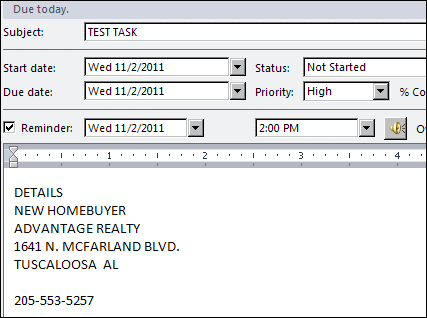
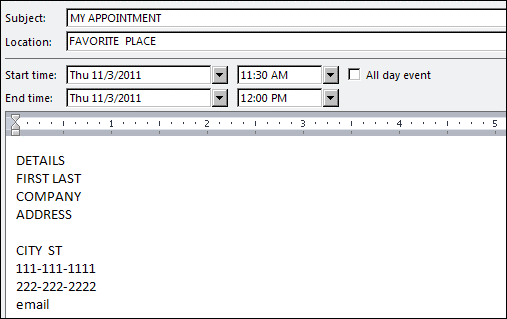
When adding, updating or deleting a task or appointment, if the following conditions are met, the item will be added, updated or deleted in the users outlook file automatically:
- Synchronize Outlook is enabled for the workstation.
Automatically Add item is enabled for the workstation. (Added only) - Automatically Update/Delete item is enabled (Updated or Deleted only)
- User is not in CPM Remote Actions.
- Item is assigned to user and Status is accepted.
- Item exists in users outlook file. (Updated or Deleted)
- Item is either no longer assigned to user or the Status is not Accepted. (Deleted only)
When a task or appointments is deleted from the browse list if the following conditions are met, the item will be deleted from the users outlook file automatically:
- Synchronize Outlook is enabled for the workstation.
- Automatically Update/Delete item is enabled for the workstation.
- User is not in CPM Actions.
- Item exists in users outlook file.
When in the task or appointments browse list and add to outlook button is used, if the following conditions are met, the item will be added to the users outlook file:
- Synchronize Outlook is enabled for the workstation
- Automatically Add item is enabled for the workstation.
- User is not in CPM Remote Actions.
- Item is assigned to user and Status is accepted.
NOTE: At this time, using the short cut to accept an Item using the right click on the Workbench will not automatically add it to the user’s outlook files.
Comments
Article is closed for comments.