
The program checks now on startup, and if there are any products not classified to a store, and there are products that are classified to a store (i.e. Store Specific Products has been set up), the program will display a notification that this condition exists.

Select Yes to review the products that are not setup.

Next, decide if the products need to be converted to a particular store, deleted, or ignoreed
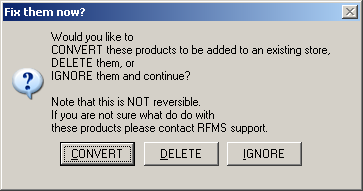
Convert
If Convert is selected, then the yes will need to confirm that they understand that duplicate records in a store could be created.

The next screen will allow the user to select the store for the unclassified product.


A warning will once again appear.

If yes is selected, then a completed process message will appear.

Delete
If delete is selected, a confirmation screen will appear.

Once all the unclassified products have been deleted, then a completion message will appear.

The user will continue to be warned of unclassified products each time the program is started until the condition is corrected either through deletion of the unclassified products or conversion to a store that is set up.
When converting existing product databases to store specific products, any Associated Product Bundles are now added to the new store code.
Comments
Article is closed for comments.