
>Utilities>System Options>Order Entry>Order Entry
Category-Configuration
Type- Must be Global 
If this option is set to "No" customer orders cannot be job costed if any of the order lines are assigned to inventory that has not been "costed". Uncosted inventory records do not have an invoice date. Also, the system compares the invoice date on the inventory record to the job cost date. The invoice date on the inventory record must be equal to or less than the job cost date before the order can be job costed.
If this option is set to Yes (not recommended), the system does not do date comparison on the job cost date and the invoice date on the inventory record. It is assumed those dates don’t matter.

If inventory is costed after job costing, a message will appear:
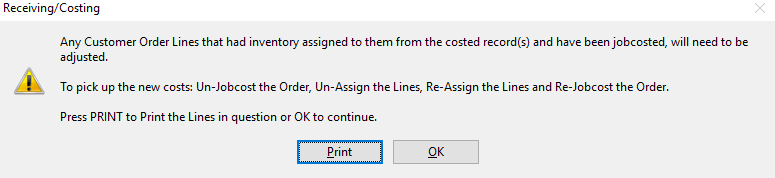
Printing this will determine what orders need to be un-job costed and which order lines need to be un-assigned and re-assigned for the job to reflect the correct costs.
- If the system is ERRM, the system option is set to no. This cannot be changed.
Comments
Article is closed for comments.