
Attention:
Beginning with version 22.1, RFMS recommends the Gmail Option instead of SMTP in the Email Configuration.
Click this link for more information: Email-Configuration
If configuring Gmail using SMTP Server, App Passwords are necessary.
Following are links to Google's support pages with information about turning off "Less Secure Apps," turning on 2-Step Verification, and how to use App Passwords.
Note: before turning on 2-Step Verification consult with your local technician or Gmail Administrator to determine if it can be used with your Gmail Account.
- https://support.google.com/accounts/answer/6010255
- https://support.google.com/accounts/answer/185833?hl=en
Please contact your local technician or Gmail Administrator for assistance with these processes.
If not sure who your Gmail Administrator is, follow this link: https://support.google.com/a/answer/6208960
Below is an example of a Gmail Configuration in RFMS.
Consult with your local technician or Gmail Administrator to ensure you have the correct Outbound (SMTP) Server Name, SMTP Port, and domain.
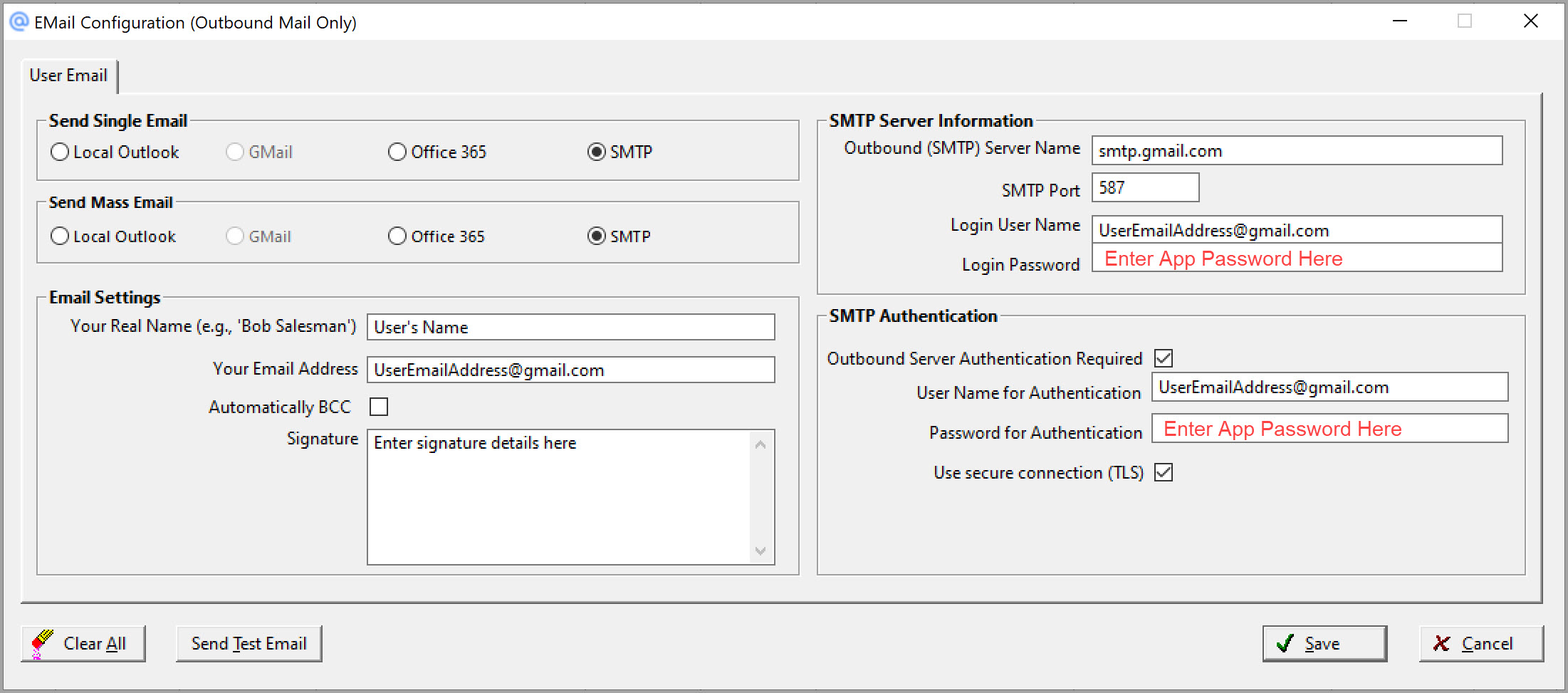
Note: All information should be manually typed into these fields and not via copy/paste method.
Comments
Article is closed for comments.