
This webinar covers the information and support areas available for our valued RFMS users. This document contains links to the areas discussed in the webinar and additional documentation to assist you in accessing these areas.
My Account
Webpage instructions included below
Access Codes –
How-to-Obtain-Online-Access-Codes
Access-Code-Accessibility-Changes
Support
Webpage instructions included below.
RFMS Website Accounts Set Up
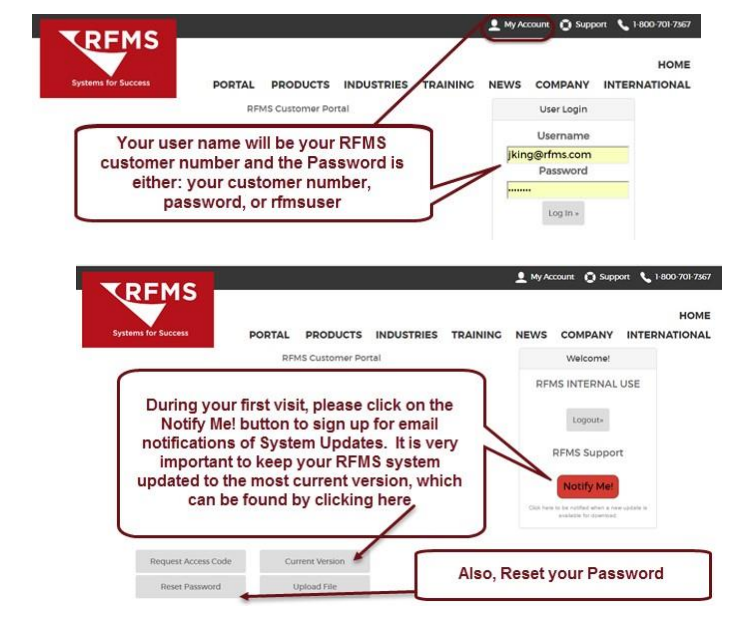
Your RFMS online My Account is where to go for Program Downloads, System Updates, Access Codes and to Upload Files. Restricted access to this portion of the website should be considered. Go to www.RFMS.com and click on My Account.
Access Codes are secured tools to allow the direct manipulation of data. They should be highly restricted and used only when no other method of adjusting data can be used. If a user is given access code privileges, it should be understood that:
• Access codes are utilized to circumvent standard accounting and security protocols. An access code authorized user can add additional access code authorized users.
• RFMS tracks the issuance of access codes but in no way can determine the ultimate use of the access code.
• RFMS will not make global changes to authorized access code users. For example: “Set everyone but Bill as an access code user”.
Comments
Article is closed for comments.