
RFMS Version 17.99
If line is added to quote from Inventory, then Inventory cost will be imported to quote line. Once the lines are exported to orders, if the user edits the line:
- the cost will update to match Products if the status is None or Gen PO
- the cost will match Inventory if the status is Reserved or Cut
- the cost will match Inventory if line status is Delivered
Unreferenced Lines are dependent on any combination of the following settings:
- Store file setting:
- 'Require Styles to be in Product for This Store' check box
- System Options:
- Generate Purchase Orders Only if Order Line is from Products
- Allow Unreferenced Lines
If inventory record is not referenced to Product file and User settings don't allow unreferenced lines, users used to encounter the following error when adding lines to quote and/or order:
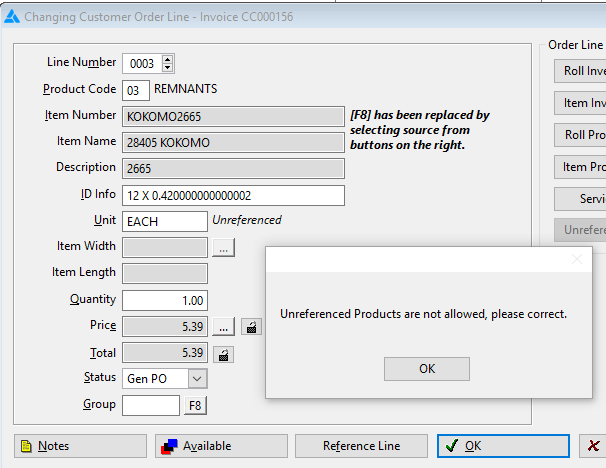
(RFMS no longer creates RFMS Created Products for Rolls that are transferred to Item via the Adjustment button  . )
. )
Inventory that is not associated with Products will be allowed to be pulled into quotes even when:
- 'Allow Unreferenced Lines' is set to No.
- AND / OR
- 'Generate Purchase Orders Only if Order Line is from Products' is set to Yes.
- AND / OR
- 'Require Styles to be in Product for This Store' check box is checked in Store File.
Once the quote is exported to Orders, users will only be able to assign inventory to those lines. Users will NOT be able to make the following changes to line status:
- None to Gen PO
- Reserved/Cut to None
- Reserved/Cut to Gen PO.
If inventory is assigned to the Unreferenced line, the user will not be able to un-assign inventory by changing line status to None. The user will need to delete that line and re-enter a new one, when:
- 'Allow Unreferenced Lines' is set to No.
- AND / OR
- 'Generate Purchase Orders Only if Order Line is from Products' is set to Yes.
- AND / OR
- 'Require Styles to be in Product for This Store' check box is checked in Store File.
User can only make the following changes to line status: Reserved to None; Cut to None; Delivered to None with the following settings:
- 'Allow Unreferenced Lines' is set to Yes.
- AND / OR
- 'Generate Purchase Orders Only if Order Line is from Products' is set to Yes.
- AND / OR
- 'Require Styles to be in Product for This Store' check box is checked in Store File.
Why did I get the Unreferenced error
The issue lies when selecting Inventory into a Quote the system is looking for the Product record associated with the Inventory. (Please keep in mind that Inventory cannot be assigned to a Quote.)
The Product record appears to be disconnected in Inventory, prompting the system to create the "unreferenced" message.
Please try to reconnect the Product by re-selecting it from within the Inventory record in the Inventory module. Then assign the Inventory to the Quote/Order to resolve the issue/message.
Comments
Article is closed for comments.