
Carpet manufacturer will add an assessment on the purchase price of ALL carpet sold in California. This is an after-tax assessment required by law to be visible on all invoices for a carpet sold in California. Details are available from Carpet America Recovery Effort – Developing Market Based Solutions for the Recycling & Reuse of Post-Consumer Carpet (carpetrecovery.org)
Activate and Set Up the Invoicing Feature
Go to >Utilities>System Options>Order Entry>Order Entry>Set Up California Carpet Stewardship Assessment
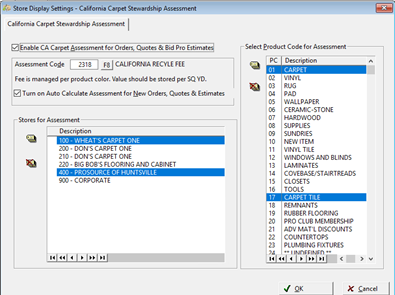
First, check the box to activate the feature.
The “recycling Assessment” product codes are selected on this tab. Tag the product codes that qualify for the CA Recycle Assessment.
As of Version 22.0 the amount of the fee is determined by the amount on the product color records.
Please note: If you are using unreferenced lines, the assessment must be manually calculated.
CA Recycle Assessment also works with Item Products. Invoices will now follow these measurement rules for CA Recycle Assessment.
- Unit of Measure must be Square Yards, Square Feet or Square Meters.
- Square feet and Square Meters must be converted to Square Yards.
- SF Qty /9= SY
- SM Qty * 1.1959 =SY
Post the assessment portion of the Inventory payable to this account and enter this account information in E-Commerce>Utilities>Additional Charges.
The assessment Fee per Square Yard can be edited here if the assessment changes.
Checking in the initially create Assessment for eligible New Orders box will default to include the recycling assessment on eligible orders. The status can be manually changed on orders, for example for out of state sales.
Each store affected by the recycling assessment should be tagged on this tab. At least one store must be selected.
Collecting the Assessment
Once this feature is set up in >Utilities>System Options>Order Entry>Order Entry>Set Up California Recycling Fee, a new field will be on customer orders. The recycling assessment automatically calculated based on the amount of Product Code 01 carpet in the lines will be displayed here. For other product codes, calculate the assessment and add to the assessment field. With the feature activated, it defaults to being charged which is shown by a green check, to not charge the assessment, for example, if selling the carpet out of state, click the button changing it to a red x.
Our understanding of the act is that the recovery assessment must be presented on the invoice, similar in many instances to a sales tax. It would seem, similar to sales tax, you can choose to discount your goods for the amount of the tax, but you have to do the discount on the selling price. The document must still show the assessment.


The recycling assessment is visible as a separate line item as the code states.
CARE_Compliance_NOV2020_v3.pdf (carpetrecovery.org)

Tracking the Assessment
Carpet manufacturers will add an assessment on the purchase price of ALL carpet sold in
California. Invoices for carpet purchased from manufacturers will have the assessment as a separate item.
Establish an account code to record these assessments.
If processing inventory invoices manually, make sure the assessment is included in the invoice total and add to the distribution when posting the payable.
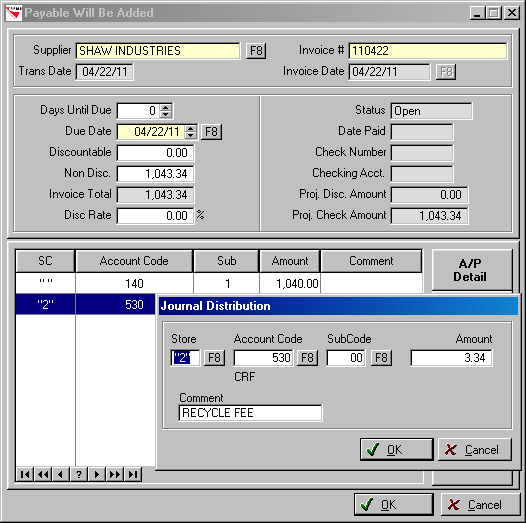
If processing invoices through E-Commerce; choose how to handle this assessment in E-Commerce>Utilities>Additional Charges.
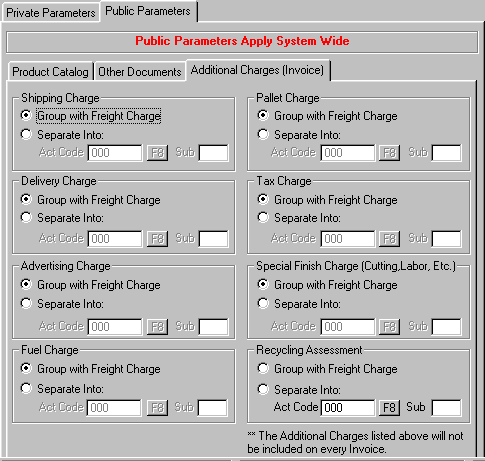
Accounting
The amounts in the recycling assessment account code will not net to zero because all carpet purchased may not be sold in the same time period. The accounting is as follows:
Non-ERRM
Purchase Inventory |
|
||
|
Recycling Assessment |
|
||
|
Debit |
|
|
|
Sell Inventory |
|
||
|
Recycling Assessment |
|
||
|
|
Credit |
||
This assessment will be posted to the journal for ERRM users at booking and for Non-ERRM users at journal close.
Comments
Article is closed for comments.