
RFMS Navigator>Sales Reports>File>Sales>Sales Totals
This option will print a report of sales totals for a period specified by the user.
|
Purpose |
Sales Analysis |
Data Source |
Delivered: job cost file. Written: customer order header |
|||
|
By Store |
Y |
By Sales Rep |
Y |
By Product Code |
N |
|
|
Profit |
N |
Customer Type |
N |
Balance Due |
N |
|
|
Order Status |
Written or Delivered |
.CSV output |
Y |
User Defined |
N |
|
|
Paper Size |
8.5 X11 |
Balance to |
|
|||
|
Common uses: Monitoring sales progress Sales person performance as a percentage of the total store business. |
||||||
|
Tips for Use: For accuracy, all delivered jobs must first be jobcosted.
Process orders into RFMS as quickly as possible giving more accurate reporting and comparisons.
Written sales include delivered sales.
A separate report will print for written and delivered sales.
The Sales Totals Report may sometimes be less than the Delivered Sales Report because jobs written from previous months may have been jobcosted in the current month.
For orders with multiple sales representatives, the sale amounts will be split between the representatives. |
||||||

The system will default to the current month for beginning and ending dates of the report; however, those dates can be edited.
Another feature is the ability to sub sort by salesperson or volume of sales. If sub sorted by salesperson, the report is printed in alphabetical order and their sales in no particular order. If sub sorted by volume, the sales are listed in descending order from highest to lowest.
This report also compares the chosen date range with the same date range as the previous year as a total or broken down by week or day.
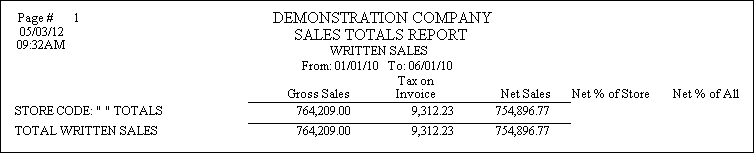
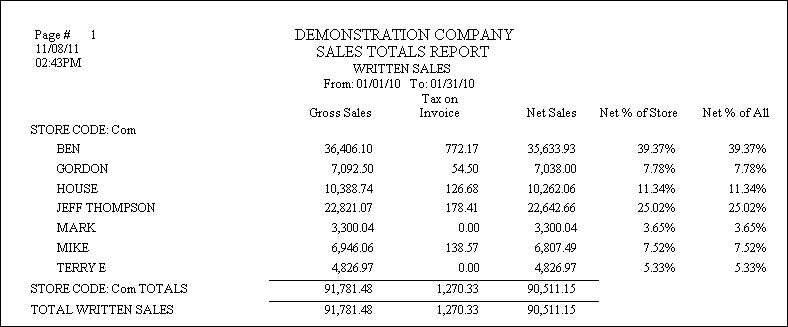
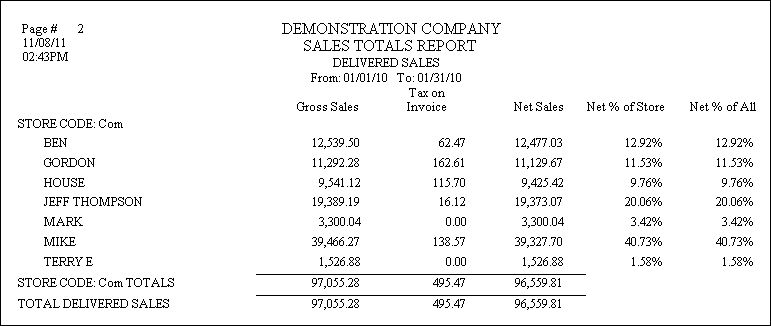
Report Columns
Gross Sales - Includes sales tax. Does not include use tax.
Net Sales - Does not include sales tax or use tax.
Net Percent - The net sales amount for the salesperson divided by the grand total of net sales.
Comments
Article is closed for comments.