
RFMS offers flexibility for where to look for tax rules. This begins with System Options.
Compute Sales Tax by selling Store's Location
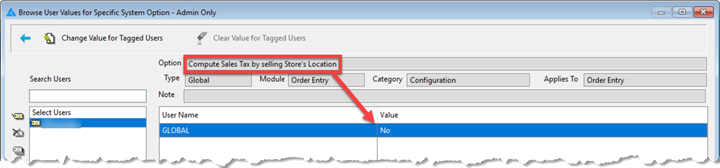
The system option Compute Sales Tax by selling Store’s Location has a Yes/No Option, but there are other factors to take into consideration with this option:
- With the option set to NO, RFMS will always look at the city file for the appropriate sales tax. If an exact match is not found, RFMS will then refer to your store settings for the sales tax percentage.
- With the option set to YES, RFMS will always refer to store’s setting for sales tax.
--> If a city file exists that matches the city in an order header, RFMS will will disregard the city's settings for sales tax orders only. - RFMS will always look at the city file for Use Tax or Line Tax percentages. Even as a YES setting, RFMS will only look at the Store File for Use or Line Tax if there is not an exact match in the City File.
NOTE: If your system option Compute Sales Tax by selling Store’s Location is set to yes AND the city file is utilized, NO MISMATCHES should be present (store file is set to Use Tax / city file is set to Sales Tax). This could result in an order being set to line tax for for user to determine the tax status per line. For additional information on line tax, see What is Line Tax?
Comments
Article is closed for comments.