
RFMS Navigator>Sales Reports>File>Finance>Sales Audit
This report gives a list of all Sales made for a specified time period.
|
Purpose |
|
Data Source |
Order Header |
|||
|
By Store |
Y |
By Sales Rep |
N |
By Product Code |
N |
|
|
Profit |
N |
Customer Type |
N |
Balance Due |
N |
|
|
Order Status |
Written Delivered |
.CSV output |
Y |
User Defined |
N |
|
|
Paper Size |
8.5X11 |
Balance to |
|
|||
|
Common uses: Searching for an order that might have been entered with the wrong date. Number of orders entered per day. Analysis date written vs date entered for handwritten sales. |
||||||
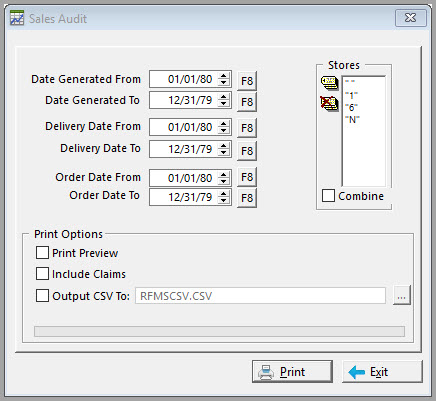
Date Generated From-To: This is the date the order was actually entered into the system. Leave this field as is to access all dates.
Del Date From-To: Enter the appropriate delivered dates.
Order Date From-To: Enter the appropriate order dates.
Stores: Select the store(s) to include on this report by single clicking on the store number(s). To select all stores, click the Tag All button that is located to the left of this field.
Print Options:
Print Preview – Click this option to review the report before printing.
Include Claims – Select this option to include a list of claims.
Output to CSV – This option will allow exporting this report to an external CSV file. Click here to see the fields sent to CSV.

Comments
Article is closed for comments.