
Order Entry>Reports>Quote Cost Comparison Report
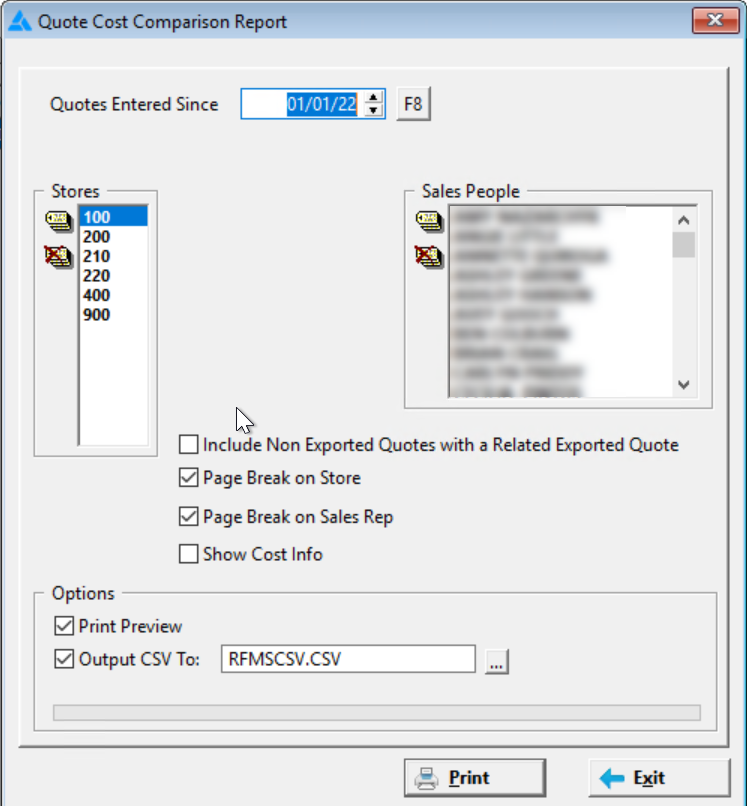
This report shows the changes to cost in products vs the cost when the quote line was created. Costs are changing quickly currently and uses need a way to see if a quote is losing money. The report compares the line cost on the quote with the current costs from the product record.


Quotes Entered Since
Select how far back to report
Stores
Choose one or more store or all stores by tagging. Selecting combined will total all chosen stores together.
Sales People
The report can be printed for a single Salesperson, all Salespeople or a combination. Select by tagging the appropriate Salesperson(s).
Include Non Exported Quotes with a Related Exported Quotes (added in version 22.1)
Check this box to include these quotes.
Page Break on sort changes
This option will cause a separate page to be printed each time a new value for the sort option occurs. For example, if sorting by Salesperson a page break will be inserted after each Salesperson.
The show cost Info checkbox is only available to users with the system option Display Costs in Orders and Inventory, also Display GP% in Orders -set to yes. Therefore it will not be sticky.
Even if there are quotes entered for the selected dates, if there have been no cost changes the report will respond with "No records met criteria."
Amount Change Column
This is the total line amount changed quantity x $ unit change.
Comments
Article is closed for comments.