
Full Order Entry Utilities User Guide
Order Entry>Utilities>Setup>Product Codes
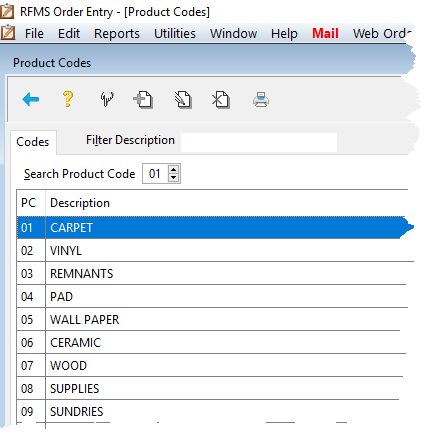
Product Codes categorize material and services for reporting. The software installs with the most common flooring related materials already entered in product codes 01-13 are set up by default upon installation of the RFMS System.
- 03 – Rug
- 04 – Pad
- 05 – Wallpaper
- 06 – Ceramic
- 07 – Wood
- 08 – Supplies
- 09 – Sundries
- 10 – In-Store Use
- 11 – Composition Tile
- 12 – Draperies
- 13 – Laminates
Product codes 01 and 02 are always Roll Products. An understanding of how and what product codes affect other areas of the process is recommended before changing them.

If E-commerce is turned on, Product codes should NOT be edited without RFMS assistance.
The ranges for Item and Service product codes are user-defined in Starting Service Code.
From this screen, existing product code descriptions may be edited or simply viewed.
No additional Product Code numbers can be added. Existing codes can be edited except Product Codes 1 and 2.
Searching Product Codes:
Throughout the Order Entry system, when a product code field is encountered, enter "00" (zero, zero) and press the Tab key. The Browse Product Code screen will display so a particular product code can be found.
To do a text search, click in the Filter Description field and type in a few characters of the product code description you are looking for. Press the Tab key and the first match will be highlighted.
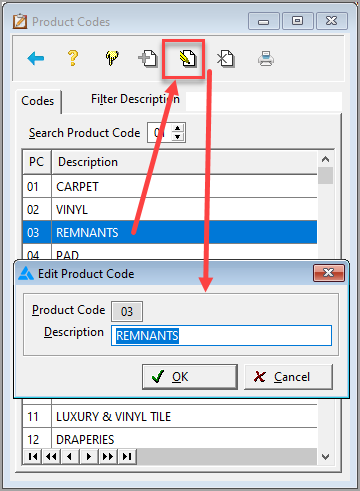
To edit a Product Code:
- Select the Product Code that you wish to change and click the Edit button.
- Enter the appropriate information.
- Click OK.
Comments
Article is closed for comments.