
Full Direct Deposit User Guide
Only use this when not using the preferred advanced set up method.
The system setup information provides for the Direct Deposit software general information about your specific configuration. It includes items such as business name, tax id number and details in connection with the ACH used.
To setup the system for the first time: Click on Setup>System Setup.
Fill in the data fields as explained below.
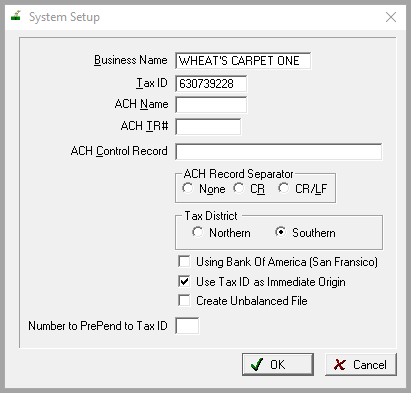
Field Explanations
Business Name
Enter here the full text name of your business. This is for reference only but must not be blank. This field can hold 26 characters.
Tax ID
Enter here the business Federal Employer Identification Number (FEIN). This number has been assigned to the business by the IRS. For questions about this number, contact the IRS. No dashes in this field.
ACH Name
Enter here the full text name of the Automated Clearing House that will process the Direct Deposit records. This is typically the name of the bank unless directed differently by the bank.
ACH Tr#
Enter here the Transit Routing number for the ACH that will process Direct Deposit records. This may also be referred to as the ACH ABA (American Banking Association) number. This is typically the same as the business account’s transit routing number unless directed differently by the bank.
ACH Control Record
Header information needed by the bank. If specified by the ACH, enter the password or control record. Your ACH must give specific direction on this matter. Do not make assumptions on your ACH control record. Your bank or ACH may not specify a control record. If so, then you should leave this field blank. Typically this is blank unless directed differently by your bank.
ACH Record Separator
The default setting is CR/LF. This formats the ACH file into columns and lines making it easier to read. Enter here the record separator specified by your ACH. Your ACH must give specific direction on this matter. Do not make assumptions on your ACH record separator. Your ACH must specify a record separator. CR is just columns.
Tax District
This is required only if sending your 940 and 941 information electronically. If needed, select the correct tax district. This is indicated on the front of the Federal Tax Booklet you receive every year. This is required only if sending your 940 and 941 information electronically.
Using Bank of America (San Francisco)
Click this field if you are using Bank of American, San Francisco.
Use Tax ID as Immediate Origin
If Use Tax ID as Origin not checked then the Bank Transit Routing number is used. See your bank for direction on this. This is typically not needed.
Create Unbalanced File
You will only use this if the bank requires an unbalanced file. The file will not have an entry for the credit to your account. This is typically not needed.
Number to PrePend to Tax ID
Some banks require a digit in front of the tax id #. Get this info from the bank. If needed it typically is 1.
Comments
Article is closed for comments.