
Full Direct Deposit User Guide
This area of Direct Deposit is where employee banking accounts into which payroll funds will be deposited are maintained. A single payroll may be divided into an unlimited number of accounts. For example, an employee may have one checking account and two savings accounts. The employee may designate a specific dollar amount that should be deposited into each savings account with the remaining funds deposited into the checking account. For this employee then, attach three different account records because each account would have a different account number.
To set up an employee account:
Click Setup>Employee Info
This is a listing of all employees in the RFMS Payroll Module, not just the ones which will be using Direct Deposit. If the employee is not listed on the screen, it means the employee does not exist in the RFMS Payroll module. Go back into RFMS payroll and add the employee.
Highlight the employee name to set up.
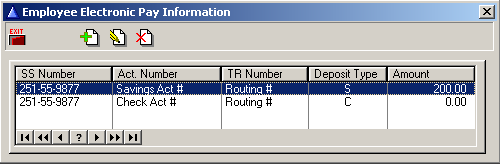
Click the Setup Employee button  . This will show the Employee Electronic Pay Information Screen which will be blank until at least one account set up for the employee.
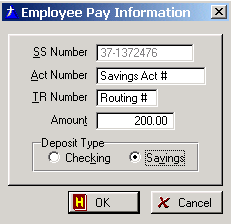
Click the Insert button  . Enter the pertinent information on the Employee Pay Information Screen.

Field Explanations
SS Number
This should pull from the employee
Act Number
Enter the account number for this account. For checking, the account number appears on the bottom of the employees check.
TR Number
Transit Routing Number. (This is a nine digit number) This number appears to the immediate left of the account number on the bottom of the check. For savings accounts, the TR number normally appears on the account statement. If the TR number does not appear on the statement, the employee may contact his or her financial institution to obtain this number.
Amount
Each employee should have at least one employee account record. This main account is necessary for deposit into the employee's main deposit account. In Direct Deposit, this account is referred to as the main account. The amount for the main account should be left at zero, as each payroll net amount is subject to change. The secondary accounts if there are any (savings, etc.), should have an exact dollar amount entered here. This tells Direct Deposit how much of the employee's deposit should be transmitted into those accounts.
Deposit Type
Indicate whether this account is the main account or a secondary account (savings, etc.)

If there are two accounts that are being used to send their payroll check to, make sure the second account is set to 0. If the check is ever less than the split then it will all go to the primary account.
As each account is added it will be listed in the Employee Electronic Pay Information Screen. If necessary, edit or delete account information from this screen.
Comments
Article is closed for comments.