
Clients with large logo files as a part of their documents have seen an increase is space needed for the RFMS database when using the PDF history function. A routine to remove PDF History data for a Date Range has been added thereby opening up hard drive space. This can be found in RFMS Navigator>Accounting>Utilities>Maintenance>Purge PDF History.
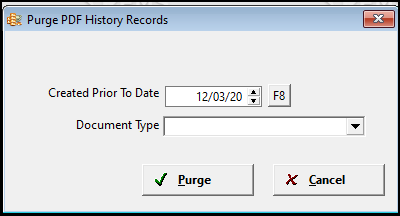
All records created before the date entered will be purged. Use the F8 key to choose a date from the calendar. Choose the type of pdf records to purge by using the down arrow to bring up the list.
- The best way to prevent this issue is to shrink the logo used on documents.
- Free web applications and software such as Rsizr (http://rsizr.com/) and Paint.NET (http://www.getpaint.net/) can be used to resize logos without a noticeable loss in quality.
- For best results and minimum file size, save resized logo as a new JPG file. (Don’t save over the old high quality logo in case you need it in the future.)
- In most cases, an image that is 150 pixels wide (or less) should be sufficient
- To further decrease the size of the image, change its color mode to grayscale – most businesses do not print in color, so this should be acceptable.
Comments
Article is closed for comments.