
Inventory>File> (Roll or Item Inventory)>Inventory Adjustment Button  or Inventory>File> (Roll or Item Inventory)>Edit>Adjustments
This selection makes an adjustment to the highlighted inventory record and posts the information to the inventory History.
Highlight the correct item. Click the Adjustment button .
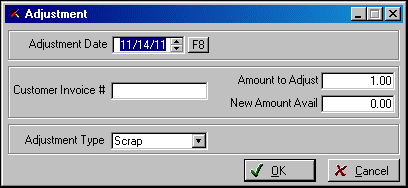
Adjustment Date: Enter the date for the adjustment, or leave as is to use the system date or, click the calendar to pick a date.
Customer Invoice #: Enter a customer invoice number, if applicable. This entry is for historical purposes and does not affect the actual customer invoice in any way.
Amount to Adjust: the total amount that will be adjusted off the current record
New Amount Available: this entry refers to the amount available to remain on the original item record. If you want to move or adjust off the entire amount available, leave this field at "0.00".
Adjustment Type: Choose the Adjustment Type. The data screens will change depending upon the type of adjustment you select.
Comments
Article is closed for comments.