
Full Inventory User Guide
Inventory>File>Purchase Orders
A computer generated purchase order number is created. All computer generated purchase order numbers will begin with #ST (Stock) and will be consecutively numbered by the computer.
After entering a purchase order, an opportunity will be given to assign this "on order" inventory to a particular customer order.
- Click the Insert button.
- Click Stock. Fill in all appropriate fields. See Field Explanations for details on each data field.
To insert an additional lines on a PO:
Click Insert Line
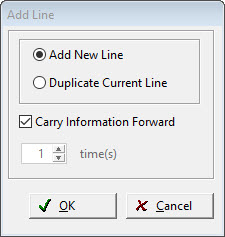
The Options are:
Add New Line: To carry pertinent information forward from the previous line, check the box.
Duplicate Current Line: A number of times to duplicate can be entered
Comments
Article is closed for comments.