
Order Entry>Utilities>Cash Drawer
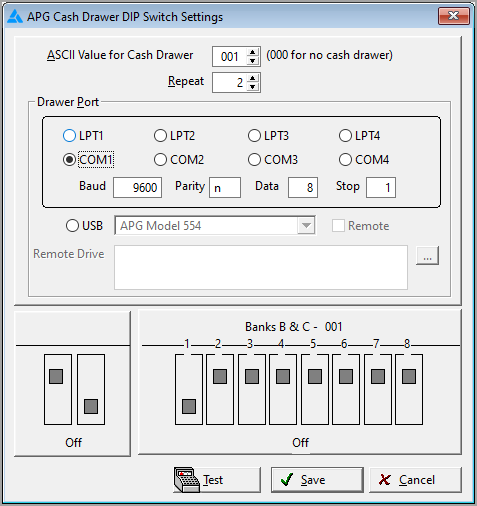
This selection allows configuration of an APG Cash Drawer to operate with RFMS Order Entry. All of these settings are Private settings, meaning the cash drawer could behave differently depending on the user’s options.
ASCII Value for Cash Drawer
This setting is the value that opens the drawer. The default setting is zero for those users who do not have the cash drawer. If you have a drawer, set it to a value other than zero. Note that when this value is changed, the diagram for the Banks settings changes. Also note that once this value is set and USB is chosen as a port, this value will be disabled.
Note that there is also a “Repeat” parameter. Previously, for the APG cash drawer, the software automatically sent the Cash Drawer value twice. So, this new parameter defaults to 2 to keep from breaking existing cash drawers.
Drawer Port
This is the setting of the port that the cash drawer is actually plugged into. Serial ports (COM1…) should not be shared with a serial printer. For example, you could have a serial cash drawer on COM1, have a printer on LPT1 and run your mouse off the mouse port.
A USB port can be used for the cash drawer.
The cash drawer opening has been improved to accommodate some users who have serial drawers (COM1 through COM4 ports) that would not open. Selects one of comports (ex Com1) and then the mode information will be activated (Baud, Parity, Data, Stop).
Bank A
This is located under the cash drawer and is a graphical presentation of typical option settings. The left option should be set to ON. This tells the cash drawer that it is not sharing a port with the printer. The right option should be set to off. This tells the cash drawer that it should see two characters in succession.
Banks B & C
This shows a graphical representation of how the options under the cash drawer should both be set based on the ASCII Value set above.

The Windows environment no longer supports the method of sharing the cash drawer port with a printer. You should have a different port available for the cash drawer; it does not have to be a physical port on the computer since these ports can be configured to a printer on the network.
The Cash Drawer does not work from remote. It only works locally.
USB Port
If you choose to use USB Port for your cash drawer, upon clicking Test or save, you will be instructed by a small message box to contact RFMS Tech Support to receive the program.
Comments
Article is closed for comments.