
Referral fees can be based on a sliding scale, depending on the amount paid for a product. The referral fee is the difference between the total using base price and the total with the chosen price. This method is called Tiered Referrals.

Tiered referrals do not apply to Claims.
With Tiered Referrals, fees are paid to the sold to customers.
Inventory sold must be associated with a product record having a pricing formulas set. If an unreferenced line is entered, the referral amount will be zero.
Steps
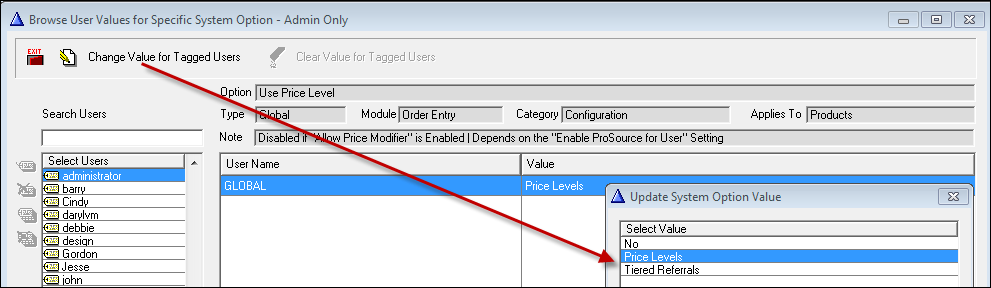
1. Turn this method on in System Options
>Utilities>System Options>Order Entry>Products>Use Price Level
This is not available with Allow Price Modifier turned on. Also, no other referral method can be active.
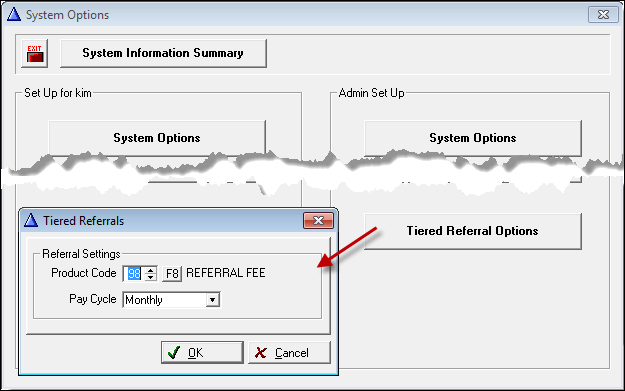
2. Set the referral product code and pay cycle from the main System Options Screen.
3. Set Price Level Prompts
Tiered Referrals will work for up to 13 price levels for rolls (1-6 using cut cost and 7-12 using roll cost) and seven levels for items with Level 1 being the base level.
Selling a product for Level one BC would result in no referral fee.
The levels can be named whatever is desired, but Tiered Referrals will refer to the levels as BC through BC6 and BC_R1-6.
4. Set Product Price Level Formulas. This can be done on a product by product basis or use the range edit feature.
For Example:
Items and Rolls Cut Cost
BC= Level One Formula (C + F) * 1.25. This will be Price 1 or P1.
This price can be used to calculate the next five prices.
BC1=Level Two Formula P1*1.05
BC2=Level Three Formula P1*1.10
BC3=Level Four Formula P1*1.15
BC4 = Level Five Formula P1*1.20
BC5 = Level Six Formula P1*1.25
Rolls Roll Cost
BC_R= Level Seven Formula (R + F) * 1.25. This will be Price 7 or P7.
This price can be used to calculate the next five prices.
BC1=Level Eight Formula P7*1.05
BC2=Level Nine Formula P7*1.10
BC3=Level Ten Formula P7*1.15
BC4 = Level Eleven Formula P7*1.20
BC5 = Level Twelve Formula P7*1.25
Once an order line has a BC level with a roll cost, it is assumed that the price will be based on roll cost. For example, a Roll good is assigned BC5R, and the users reset with Default BC3? The program will see that the Line is using Roll cost, so its Tiered Referral will change to BC3R, and it will be refigured.
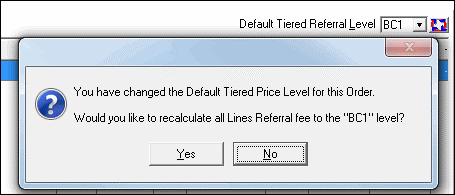
5. Enter the customer order or quote. A default level can be set for the entire order.

6. If lines are already entered, and this number is changed, the system will give an option of changing the existing lines to the new level or leaving them at the old levels. Use the reset button next to the default level to change all the lines back to the default level.
7. The level can be changed on individual lines in two different ways.
a. Click the ellipses button next to the price A listing of all price levels with the corresponding prices will display. Choose the desired level.
b. Use the dropdown list next to the price level field and choose the desired level.

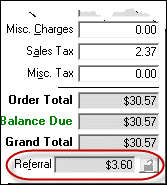
8. The total referral amount is listed in the totals section of the order.
9. When entering unreferenced lines, any price can be entered, and the referral amount will be calculated based on the Tier level chosen and this table.
P=Price entered.
BC – no calculation
BC1 – P – (P/1.1)
BC2 - P – (P/1.15)
BC3 - P – (P/1.2)
BC4 - P – (P/1.25)
BC5 - P – (P/1.05)
BC_R – no calculation
BC1R – P – (P/1.1)
BC2R - P – (P/1.15)
BC3R - P – (P/1.2)
BC4R - P – (P/1.25)
BC5R - P – (P/1.05)
Example1: BC4 = $12.50 calculation: $12.50 – (12.50/1.25) = $2.50 The unreferenced referral fee contribution amount is $2.50/unit.
Example2: BC1 = $16.50 calculation: $16.50 – (16.50/1.1) = $1.50 The unreferenced referral fee contribution amount is $1.50/unit.
10. When the order is job costed a provider record for the referral fee to the Sold To customer will be created. The level cannot be changed after an order is job costed.
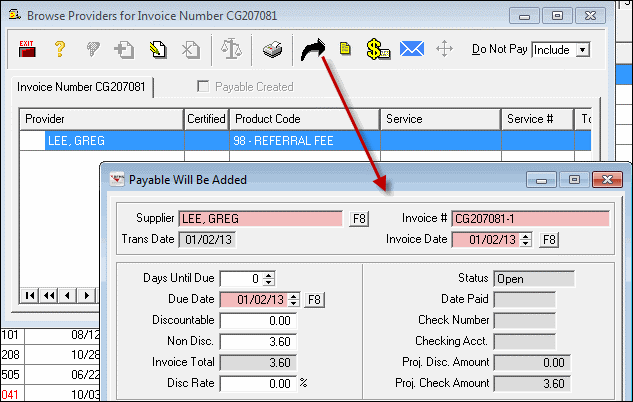
From the Browse Providers list on the invoice, click the arrow button to create a payable for the referral fee.
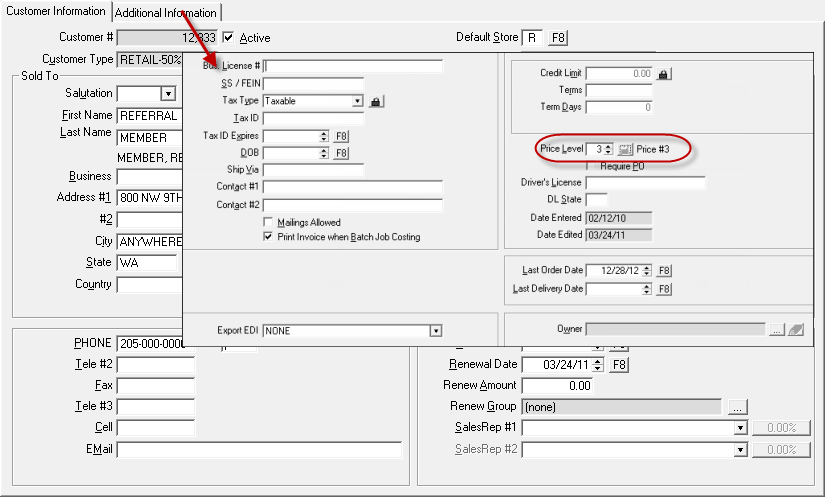
11. A default price level can also be set for a customer. Go to the additional information tab on the customer record and choose the default price level.
Comments
Article is closed for comments.