
Inventory>Reports>Roll Inventory Information Report
This report allows printing a detailed up to the minute report that lists all rolls that are currently in inventory. The report is broken into the same fields that are located on the Roll Inventory screen.
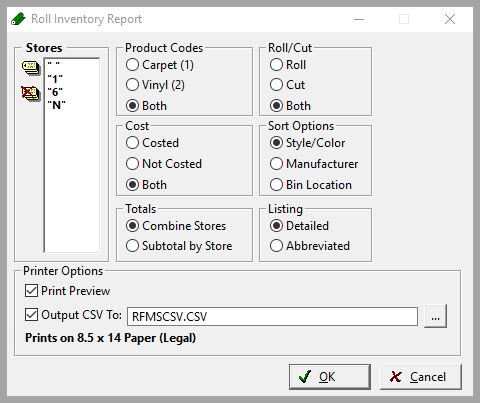
Field Explanations
Stores
Choose one or more store or all stores by tagging. Selecting combined will total all chosen stores together.
Product Codes
Choose which Product Codes to include on this report.
Roll/Cut
Choose whether for the Roll material, Cut material, or both to display on this report.
Cost
Choose whether to display Costed rolls, Uncosted rolls or both on this report.
Sort Options
Choose between sorting by Style/Color, Manufacturer, or Bin Location on this report.
Totals
Choose whether to display totals on this report by combining stores or subtotaling by each individual store.
Detailed Listing is the only selection.
Print Preview
Select to view the report on the screen before printing.
Comments
Article is closed for comments.