
When sales tax is included on an Accounts Payable invoice, the following steps should be followed:
- Cost inventory invoice excluding the tax portion at Inventory > File > Receiving/Costing > Cost (or Receive) from Invoice.
- Send costed inventory to Accounts Payable using AP button.
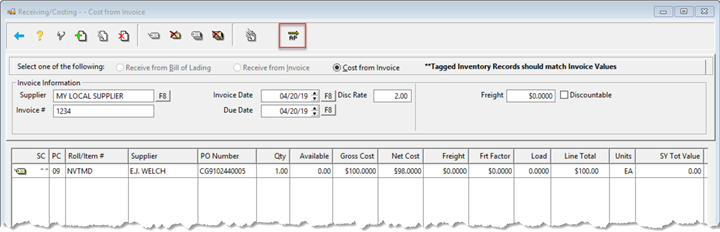
- EDIT Invoice
- Add the sales tax amount to the Non-Discountable field of the invoice.
- Code the difference to the Sales Tax Liability account code.
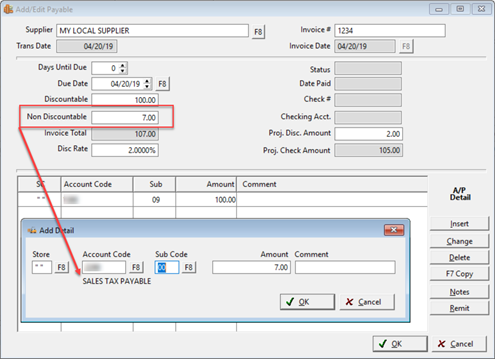
- Click OK to Save.
After the Tax Liability Report has been run (See Tax Reporting), any sales tax posted on Accounts Payable invoices for that period needs to be subtracted from that posted report.
- Go to Accounting > File > Accounts Payable > A/P Reports > A/P Entered by Account Code.
- Enter the Beginning and Ending dates for the same period as Tax Liability Report.
- Tag Sales Tax Liability Account Code (name may vary).
- Tag Stores.
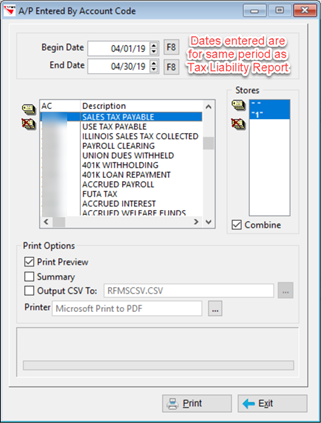
- Subtract the total from A/P Entered by Account Code report from the Proposed Tax Liability Report.
Comments
Article is closed for comments.