
Inventory>Utilities>System Options>Inventory>E-Commerce or X> Utilities>System Options>Inventory>E-Commerce
Category-Configuration
Type- Must be Global 
This option allows sending of 850 with will advise information included.
Will Advise is a feature used especially by some larger West Coast dealers. When a need for a truck load order is foreseen a will advise is issued to alert mills to schedule production and possibly warehouse the material closer to the dealer until the product is required. The purpose for Vendors doing bulk ordering need a truck load to tell mills will need in the future for setting a production schedule West Coast clients mainly will warehouse instead of shipping
EC Users will check will advise on the verify account number Screen.
Non-EC Users will check WA next to requested ship date on the purchase order screen. The taken by field must be completed before the WA box will accept any entry.

You do not have to be an E-Commerce user to use the will advise status. When you turn on the will advise status the system will automatically turn on the EC Option Verify Account # and Carrier when ordering.
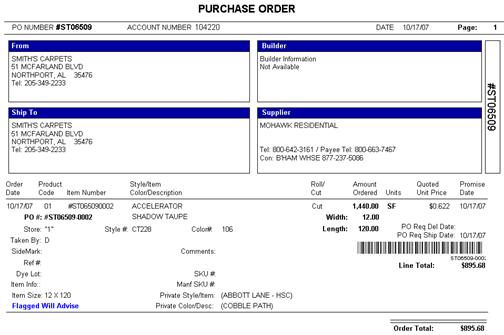
Printing the Purchase order with a Will Advise status
When the Purchase Order has a status of will advise the print out will print “Flagged Will Advise.”
Comments
Please sign in to leave a comment.