
Accounting>File>Sales Commissions>Commission Information>Edit button
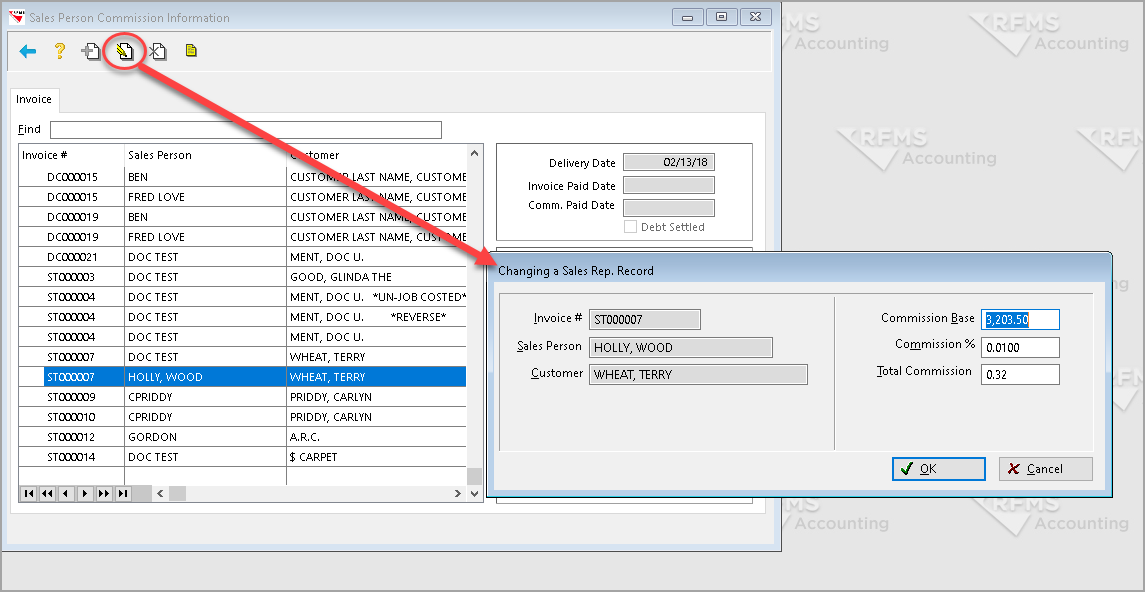
This function allows changing the Commission Base, Commission % and Total Commission for a Sales representative Record. A commission record can be changed only if the commission paid date is blank (unpaid). On unpaid records, the commission base percentage, the commission percentage or the actual commission dollar amount can be changed.
Invoice #
This field provides the invoice number for a particular order. You may find the order in Order Entry by searching by Invoice number.
Sales Person
This field provides the Sales Person’s name that is attached to a particular order.
Customer
This field will provide the name of the customer who requested a particular order.
Commission Base
The commission base type is the base number that the commission percent will be figured on. That percentage can be based on one of the following:
Invoice Total - Tax Charged
Profit
Amount Paid (collected)
Material
Inv. Total - Tax Charged (Original Only)
Inv. Total - Tax Charged (Overages Only)
Commission %
This number represents the percentage of commission that will be paid to the salesperson.
Total Commission
This figure is the total amount of commissions paid for a particular customer order.
Comments
Article is closed for comments.