
The Provider Rate Matrix allows entering a service product record with one cost and load and then choosing different rates of pay for this service. What about the difference between the service line and the provider record? As before this feature, the provider rates and the service line costs will have to equal and will be changed to the amount paid to the provider. There are options now for the load on the service lines.
The system option Method for Balancing Provider Charges with Order Service Line Costs sets how the load on the line cost will be posted.
This system option is not dependent on using Provider Rates Matrix and does not have to be turned on. If not turned on with a special access code received from your trainer, the system will behave as it always has: Set Order Line Costs to Provider Record Rates, and the Order Line Load will be set to Product Record Load when the provider’s record is balanced. The Load field will be updated for all Order Service Lines, not just those that do not balance when a provider record is added or edited.
These options will be executed depending on the system option Automatically Balance Providers.
With the system option:
Automatically Balance Providers = True will cause this to happen automatically while job costing.
Automatically Balance Providers = False then this will happen when the user manually Balances Provider Charges with Service Lines.
Each option is explained and an example is given, while the example shows one provider record and one service order line the system works as it always has, taking the total per product code of all the provider records and amortizing that to the cost of all the order lines with that product code.
Set Order Line Costs = Provider Record Rate
Order Line Load =Product Record Load
NOTE: This is the default option.
The cost of the service lines will be overwritten to equal the current load on the product record. In case the load was changed between the time the line was added and the current time.

The rate which was pulled in was .20. There is no option to add a load to the rate with this selection.
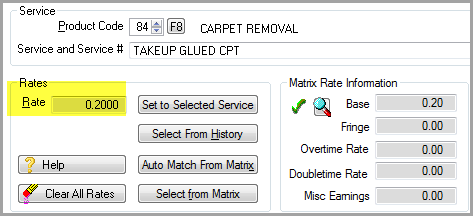
The cost has been changed from the service cost of .14 to the provider rate of .20.
The load has been left at the service load of .01.

Set Order Line Costs=Provider Record Rate
Order Line Load = 0
The cost on the service lines will be overwritten to equal the rate on the provider records. If any load was brought over from the product record it will be overwritten to 0.
With the same line and provider record before, after balancing the line would look like this.
The cost has been changed from the service cost of .14 to the provider rate of .20.
The load has been changed from the service load to a load of 0.

Method has been added to the Set Order Line Cost = Provider Record Rate. Users can select to Use Highest or Use Average. This allows provider load to go the line load, thus being the load applied at job costing has used the highest load on all lines of the same product code.
Set Order Line Load = Provider Record Load
Set Order Line Load = Provider Record Load (By Product Code, Service and Service Number)
Set Computer Generated Order Line Load = Provider Record Load (By Product Code)
The cost on the service lines will be overwritten to equal the rate on the provider records. If any load was brought over from the product record it will be overwritten equal the load entered on the provider records.
The Product Code, Service and Service Number must match between the Order Line and the Provider Record in order for the Load to be updated. For those Order Lines that do not have a matching Provider Record the Load will be updated to 0.
This option replaces the old system option for Order Entry to Post Load to Provider Records. With this option selected a load field is displayed on the provider record.
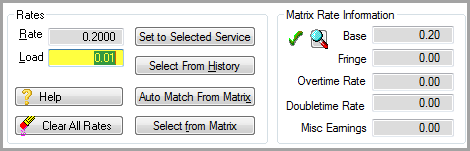
If the rate record has a service record as part of its definition, initially the load will be pulled from that service record.
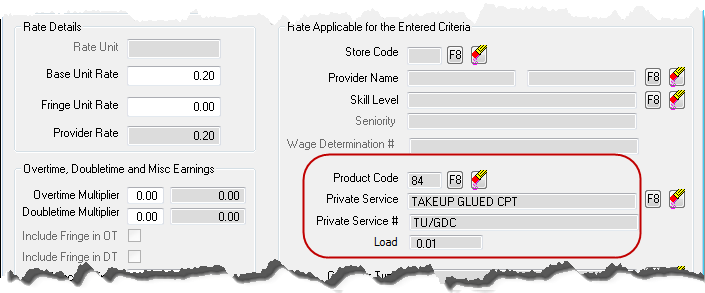
The load can be manually adjusted on the provider record.
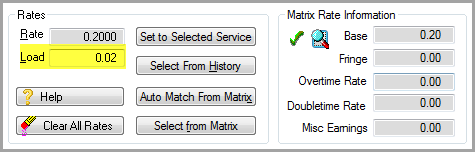
With the same line as before and provider record above, after balancing the line would look like this.
The cost has been changed from the service cost of .14 to the provider rate of .20.
The load has been changed from the service load of whatever is entered on the provider record load in this case .02.

This selection which allows provider load to go the line load, thus being the load applied at job costing has used the highest load on all lines of the same product code. It was discovered that some clients had loads on the provider records that were greatly varied and so as of version 20.99 a new option to average the load vs take the highest was added.
Set Order Line Costs = Provider Record Rate
Order Line Load = Difference between Provider Charges and Original Order Service Cost (By Product Code)
The cost on the service lines will be overwritten to equal the rate on the provider records. If any load was brought over from the product record it will be overwritten equal the difference between the original service cost and the provider rate. This option would be used to not affect commissions based on the installer’s rate.
With the same line and provider record before, after balancing the line would look like this.
The cost has been changed from the service cost of .14 to the provider rate of .20.
The load has been changed from the service load of .01 to the difference between .14 and .20, -.06.

Comments
Article is closed for comments.