
Order Entry>Utilities>Set Up>Price Changes
Browsing Price Changes
This option allows viewing all price changes that have not been cleared from the file. For a printed listing, go to Order Entry>Reports>Price Changes. Search by the date field by typing in a date and pressing the TAB key. A price change record is created when the selling price of a product is changed on the customer order line and the Utilities>System Options>Order Entry>Track Price Changes is set to yes.

Clearing the Price Changes File 
Price change records may be cleared up to a specific month and year. The default will be 3 months prior to the current system date. It is possible override this date.
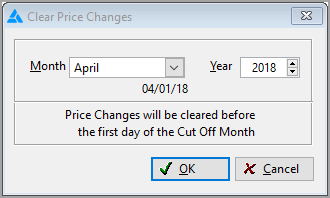
Cut-off Month
Enter a date here and the system will remove all price changes prior to the date entered. Click the down arrow to select from a month pick list.
Year
Click the up or down arrows to change the year.
Track Price Changes and Require Authorization Codes
These two options work together, affecting the way established selling prices may be changed. The following combinations are allowed and will have the following effect:
If Track Price Changes is set to Yes AND Require Authorization Codes is set to yes, an authorization code will be required before price changes are allowed. The person who authorized the change will be recorded in the price changes file.
If Track Price Changes is set to Yes AND Require Authorization Codes is set to NO, price changes will be allowed. However, in the price changes browse and on the report, the authorizer will be shown as dashes.
Authorization codes are set per salesperson in Order Entry>Utilities>Authorization.
Reports on price changes can be accessed in Order Entry>Reports>Price Changes

If Track Price Changes is set to NO AND Require Authorization Codes is set to NO, price changes will be allowed. However, no prices changes will be recorded.

Using these options allows management to track price changes made outside the price points allowed for a product by detailing date and name for each price change. This allows a review of price changes. For example if changes are allowed to meet a competitor’s price, the allowed price may need to be changed in the system.
Comments
Article is closed for comments.