
Products>File>Roll or Items
Par Commissions is a method of computing line commissions on a sliding scale in order to gain a weighted average commission amount on specified products (on a line by line basis). The ability is given to enter low and high selling prices along with a low and high commission percentage. When a product is sold that falls in between the high and low selling prices, the system will figure the commission percentage based on the ratio for the scale. To use this feature, a high and low selling price in the Products module must be entered. These figures correspond with a high and low commission’s percentage
For example:
The high selling price is entered as $15.00 with a high commission % of 10%. The low selling price is entered as $10.00 with a low commission % of 5%. The line price for the product is $10.00. The commission would be 5%. OR The line price for the product is $12.00. The commission would be 7%. You may also enter a standard pad selling price, along with a pad upgrade percentage rate. If the pad is sold for more than the standard price, the commission percentage will be increased by the amount entered in the pad upgrade percentage field.
Another example:
The standard selling price of the pad is $1.50 with a pad upgrade percentage of 1%. The commission for the product was figured at 7%. The pad was sold for $2.00. The commission for the product will be raised to 8% because the pad was sold for fifty cents more than the standard pad selling price.
Using Par Commissions on a Customer Order
In order to use Par Commissions:
1. The option Allow Line Commissions should be set to yes.
2. The option Disable Line Commission Editing should be set to no
3. The option Use Par Commissions should be set to yes.
4. The option Pay Commissions On Partial Billing Groups is should be set to yes.
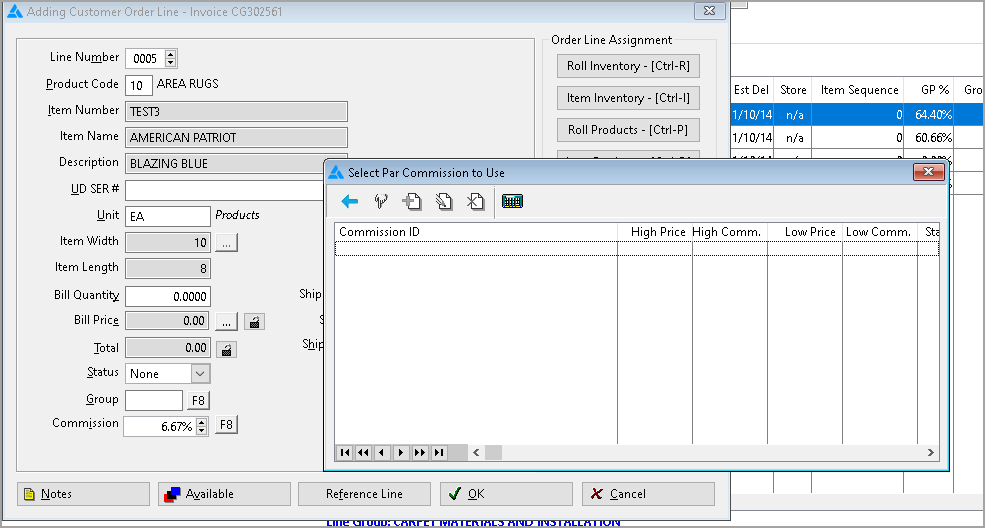
When entering a line on an order, press F8 at the style or name field to import the product information from products. Press F8 at the commission percentage field to display a par commission menu that contains:
Products
Select this option if you need to verify the product information to be sure you have selected the correct product record. (There may be more than one product record for this product.) You can also check the high and low selling prices.
Par Commission Calculator
Select this option if you need to compute par commissions but the product information entered on the line has not been set up in products.
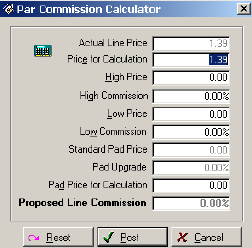
Fields for the calculator are:
List Price
Enter the normal selling price for this product.
Price Increment
The price increment s subtracted from the list price to determine the low price.
Low Commission %
Enter the commission percentage to be paid if the product is sold at the list price.
Standard Pad Price
Enter the normal selling price for pad.
Actual Pad Price
Enter the actual selling price for the pad that was sold with this product.
Line Price
Enter the actual selling price for the product on the line.
Pad Upgrade
This field will contain either a “Y” or “N”. A Yes will appear if the actual pad price is more than the standard pad price.
Line Commission %
The system will calculate the correct commission percentage base upon all of the above entries.

For information on setting up Par Commissions go to the Products module and select Rolls or Items.
Click the Par Commissions button. The Setup screen will display. Press the F1 key.
Comments
Article is closed for comments.